

TL;DR: Most rollouts go live in two to four weeks, with a six-week plan including two weeks of parallel testing as the cautious option. Voice is native on every Dixa plan, while Zendesk, Gorgias, and Kustomer sell voice as an add-on and Intercom prices Fin Voice through sales. Mim costs €0.40 per conversation whether it resolves or escalates, and the rate never rises with volume. On a worked 10-agent example, the same peak conversation mix costs roughly $1,640 on Dixa against $2,875 to $3,650 on Zendesk. Go live at least six weeks before peak starts, whichever rollout plan you choose.
Premium ecommerce teams can run support with a small crew in summer and face several times that volume by November. If the platform can't absorb that swing without seasonal hires and IT tickets, the capacity ceiling comes from the contact centre architecture itself. That raises a definition problem: What is CCaaS, and does it address the capacity issues that keep you hiring seasonal agents every October?
CCaaS stands for Contact Centre as a Service. It replaces the on-premise hardware, phone lines, and maintenance contracts of a traditional call centre with a cloud-based subscription covering voice, email, chat, SMS, and social channels in one platform. When volume grows, you adjust the subscription and the vendor's infrastructure absorbs the load.
This guide defines the CCaaS model, then walks through the four criteria that determine whether a platform survives your peak season: voice quality under load, intelligent routing, integration depth with your commerce stack, and cost per contact.
Understanding the CCaaS model for CS leaders
Defining CCaaS and its key features
Contact Centre as a Service is a cloud-based software model that provides the technology needed to manage customer interactions without owning the underlying infrastructure. This type of platform combines customer interaction management, routing, self-service, AI, workforce management, quality management, and analytics.
The core difference is operational. With on-premise systems, you buy servers, hire IT staff to maintain them, and add physical phone lines when volume grows. With CCaaS, the vendor manages the infrastructure. You can add agents within hours and change routing rules in Flow Builder without waiting in an IT ticket queue.
CCaaS vs. on-premise contact centres
The maintenance shift frees your IT team from phone system support, and the scaling shift loosens the link between volume and headcount.
Why ecommerce teams adopt CCaaS
Ecommerce customer service runs in volume cycles. Historically that meant hiring seasonal staff, training them, and accepting the quality risk.
Cloud contact centre platforms can ease that cycle by integrating natively with Shopify, Magento, and WooCommerce, so agents view live order data, process refunds, and track shipments without leaving the workspace.
How CCaaS addresses seasonal capacity bottlenecks
How tink and Charles Tyrwhitt reduced headcount
tink cut Black Friday seasonal hires from 80-90 to 10 after rolling out Mim. The same platform change absorbed the peak volume the extra headcount used to cover.
When your platform unifies voice, email, chat, and social in one queue and AI handles routine queries like WISMO and order status updates, your existing team can absorb higher volume. Charles Tyrwhitt, a menswear brand with 130 agents across the UK, South Africa, and Turkey, saved the annual equivalent of 12 full-time hires through the transformation programme it built on Dixa.
Real-time reporting for staffing decisions
Delayed reporting means you discover queue spikes after they happen, while CCaaS platforms typically report live.
With real-time dashboards, you see chat backing up at 2 PM on a peak day and move an agent from email immediately. Dixa includes real-time analytics in every plan, including the entry-level Team plan.
Build contact flows in Flow Builder without developers
On-premise and some legacy cloud systems require IT tickets to change routing rules, IVR flows, or escalation paths. Modern CCaaS platforms let you build these workflows in no-code builders like Flow Builder without waiting for engineering resources.
You should be able to:
- Route conversations by customer segment, order value, or VIP status without code
- Trigger automated responses for common questions when queues spike
- Change escalation paths the same afternoon you spot the problem
- Build AI agent logic for handling specific inquiry types without consultants
When adding a new automation requires a software engineer, that dependency costs you during peak, when routing changes are urgent.
Evaluating CCaaS vendors for your ecommerce stack
Not all cloud contact centre platforms handle ecommerce equally. Some are built for B2B SaaS with async email support, and others lack the voice depth or commerce integrations you need.
Define your must-have CCaaS features
Before you take a demo, know what matters for premium ecommerce:
- Native voice on every plan. If voice support is part of your offering, ensure the plan includes it without an add-on. Zendesk includes phone in Suite Team and Professional but bills call minutes, phone numbers, and text as add-ons, and complex contact centre needs require the separate Contact Center add-on. Gorgias and Kustomer sell voice as an add-on, and Intercom prices Fin Voice through sales. Dixa includes voice in every plan.
- Real-time analytics on entry plans. If your platform requires daily exports for peak-season visibility, you're planning blind. Entry plans should include live queue depth and agent status.
- AI priced per conversation. Resolution-based pricing charges you when AI succeeds. Dixa's Mim costs €0.40 per conversation, whether it resolves or escalates, which makes costs easier to forecast. Zendesk AI charges per automated resolution, so the AI bill climbs with every answer the AI delivers during peak.
- Native ecommerce integrations. If you run Shopify, verify the platform can handle order editing, refunds, and cancellations inside the agent workspace without requiring tab switches to your admin panel.
Planning CCaaS for your peak season
A CCaaS migration is a peak-season risk if timed wrong. Follow this framework:
- Leave a six-week buffer before peak. For mid-November peaks, go live by early October, which gives you a buffer to find issues, stabilise workflows, and dial in routing before volume hits.
- Run two weeks of parallel testing. Operate your old system and the new CCaaS side by side. Measure FRT, CSAT, and backlog on both. Only cut over when the new platform clearly outperforms.
- Secure a peer reference. Talk to a customer in your vertical (fashion, food, home goods) who is already live about their go-live experience and peak performance.
If you miss the six-week buffer for a mid-November peak, wait until January and run the season on your existing platform. A failed migration during Black Friday is worse than another year on the wrong tool.
Assessing carrier uptime and call performance
Voice quality separates professional CCaaS platforms from repackaged software. If your platform includes phone support, it must meet carrier-grade standards.
Ask vendors how they build for voice reliability
Before signing, ask each vendor how it builds for voice reliability:
- What is your SLA for voice uptime, and how do you measure it?
- What carrier relationships do you have? (Some providers use wholesale carriers, others hold direct telecom relationships.)
- What is your call completion rate? (Ask for the percentage connecting cleanly without drops.)
- Do you have automatic failover to backup carriers?
IVR, call recording, callbacks, and voicemail ship with Dixa's voice channel on every plan at no additional cost.
Gartner named Dixa one of four Digital Customer Service Specialist in its August 2025 Competitive Landscape: Digital Customer Service report, the only one recognised specifically for advanced native voice capability. That recognition signals mature voice infrastructure.
Request the vendor's uptime and outage history
Ask for:
- Published SLA and measurement methodology
- Outage history for the past 12 months (number, duration, root cause)
- Incident communication protocols (status page, SMS alerts, email)
Assess carrier footprint by region
If you serve customers across the UK, EU, and US, verify your vendor uses local carriers in those regions to minimise latency. Dixa maintains EU data hosting for European brands.
How intelligent routing reduces queue backlogs
Skills-based routing for complex queries
Not every agent can handle every query, so skills-based routing sends refund requests to agents trained on your return policy, product questions to specialists, and VIP customers to senior agents.
On peak days, when every agent is at capacity, routing quality determines whether you clear the queue or drown in backlog.
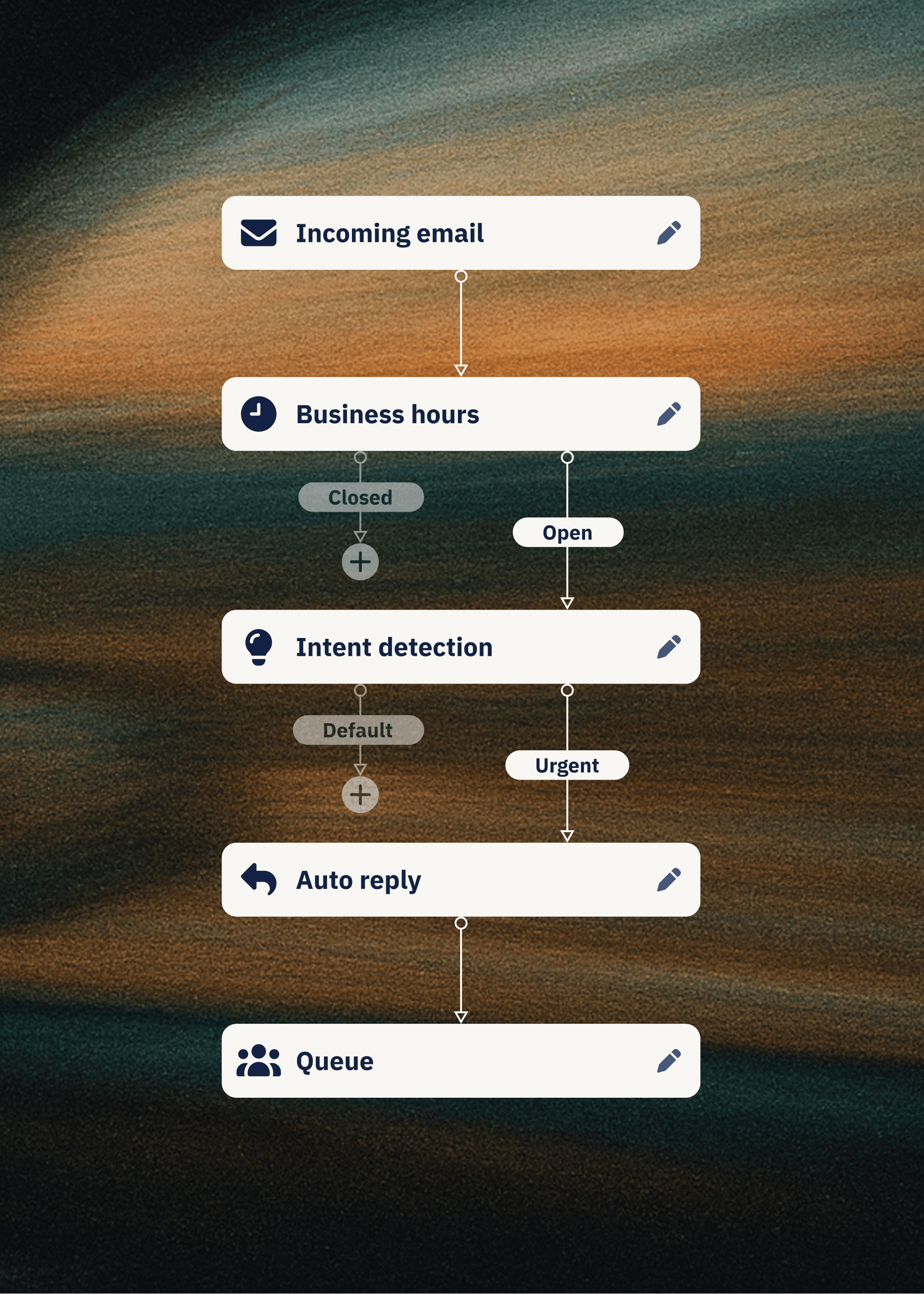
Dixa routes conversations by skill, language, priority, workload, and VIP status, and AI Intent Detection identifies what the customer wants before they finish typing and routes accordingly. Both are configured in Flow Builder.
Automating WISMO to reduce agent workload
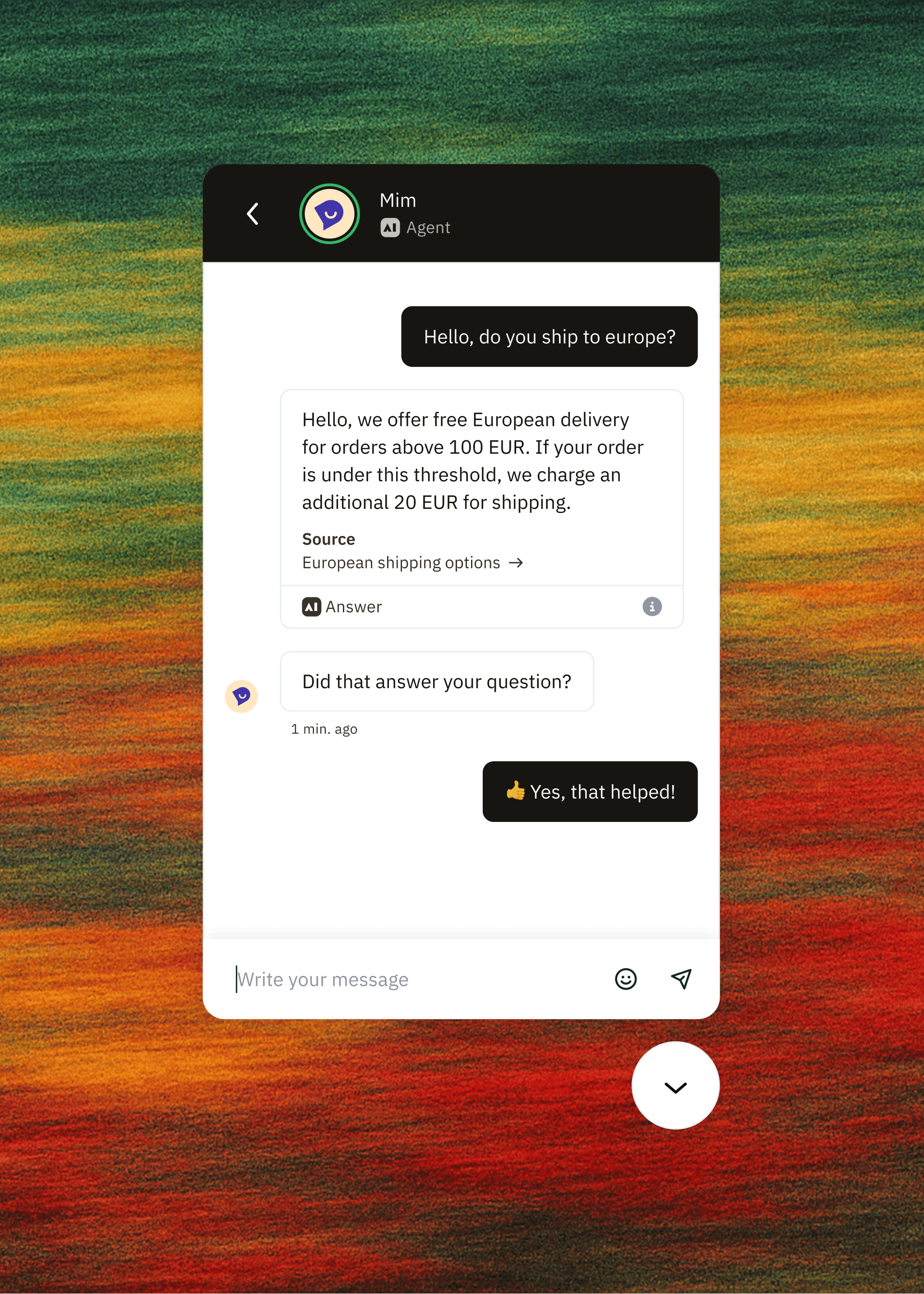
WISMO ("Where Is My Order?") is the volume killer during peak season. Customers want to know when their order ships, whether it is in stock, or where their return stands. A CCaaS platform with AI agents and live order data can answer most WISMOs without human involvement, and Mim on Voice handles the same questions over the phone.
This automation frees your agents for cases that need a person, such as damaged goods, missing items, or complex custom orders. At tink, Mim handles 59% of emails and 70% of live chats without human involvement, which is what made the seasonal roster cut possible.
Unifying customer history across channels
A customer emails on Monday, then calls on Tuesday, and if those channels run on separate systems, the agent answering the call has no context. The customer repeats their issue, handle time inflates, and CSAT drops.
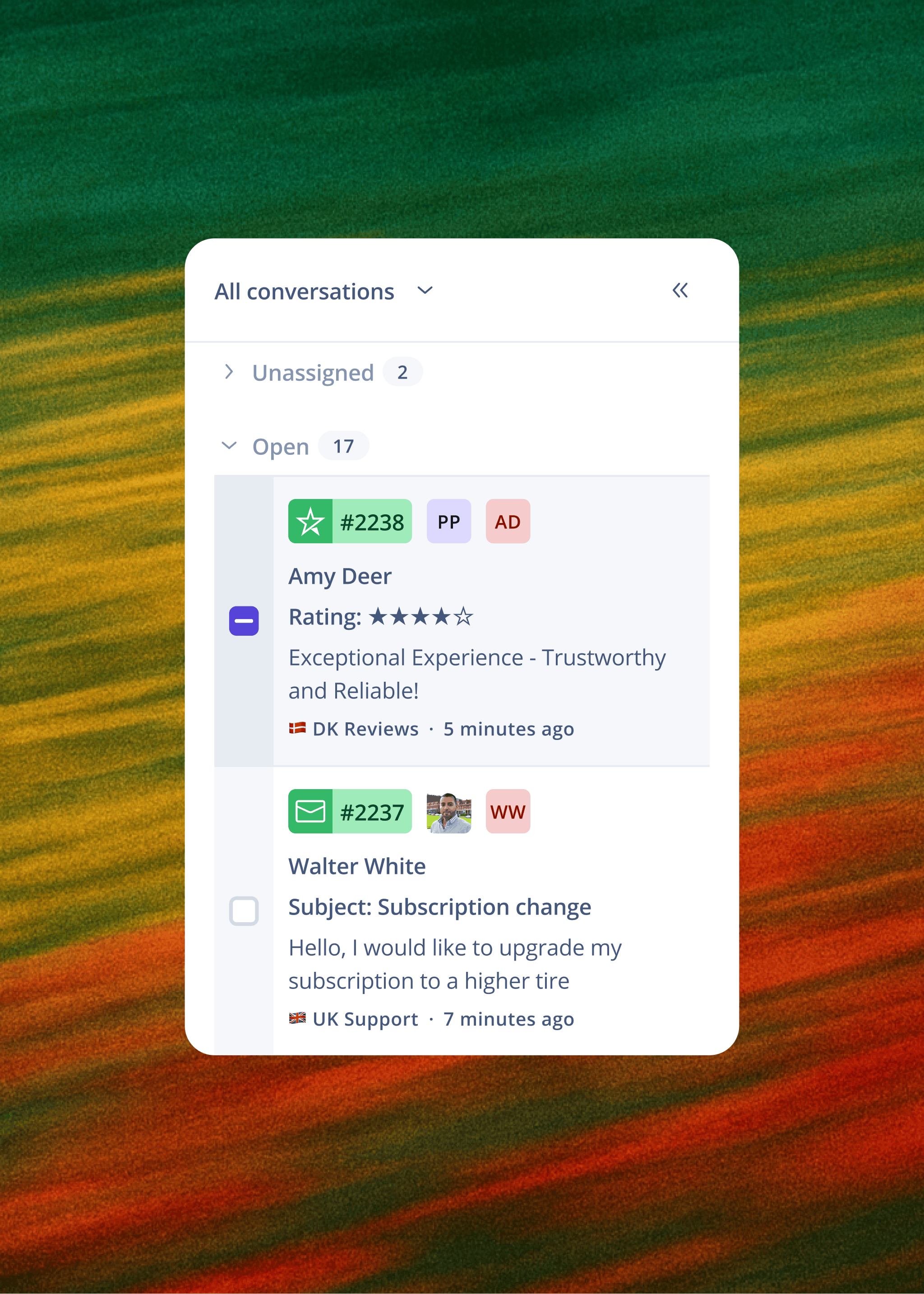
In a unified CCaaS platform, the Tuesday call lands in the same queue as the Monday email, and the agent's workspace shows the full conversation history automatically. Team Hub pulls the customer's order history, past interactions, loyalty status, and AI-suggested replies onto one screen. Agents stop switching between your OMS, email tool, and phone system, and average handle time can drop because the context-gathering phase shrinks.
Connecting your tech stack for faster resolutions
Automating order data in your agent view
Premium ecommerce brands run on Shopify, Magento, or a custom stack, and order data sits at the centre of every fast resolution.
A CCaaS platform that integrates natively pulls this data automatically. Dixa integrates with Shopify, Magento, WooCommerce, and custom builds, so agents can view order history, track shipments, process cancellations and refunds, and update customer details in the workspace where they handle conversations.
Eliminating agent tab switching
An agent may switch between an incumbent helpdesk, an OMS, email, internal chat, and a knowledge base to answer a single question. Each tab switch costs time and attention, and across a day's conversations those losses compound.
Charles Tyrwhitt cut email median first response time from 3 hours 45 minutes to roughly 50 minutes on Dixa, where order data, conversation history, and live channel access sit on one screen.
Comparing CCaaS pricing models and total cost
Pricing models, and how the major vendors price them
Zendesk's Suite plans start from about $55 per agent monthly. Zendesk AI runs $1.50 per automated resolution on committed volume or $2.00 pay-as-you-go. Gorgias charges per ticket, from $10 monthly for 50 tickets, so the bill rises with volume. Prices are as of November 2026 and change, so check each vendor's page before you budget.
Dixa charges €49 (Team) or €139 (Professional) per agent monthly on annual billing, with Enterprise priced on request, and Mim costs €0.40 per conversation with no allowance cap and no overage rate, whether the conversation resolves or escalates.
Compare cost per contact for a 10-agent team
Cost per contact gives a fairer comparison than headline price.
Example: 10-agent team handling 5,000 conversations monthly during peak, with AI handling 2,500 of them
Zendesk AI bills per automated resolution, so using Mim's 62% median resolution rate as a like-for-like assumption means about 1,550 of the 2,500 AI-handled conversations count as resolutions. Dixa's Mim bills every conversation it handles, resolved or escalated. Treat the totals as directional, because Zendesk's cost also depends on your plan tier and excludes metered call minutes.
Zendesk's $55 entry seat is close to Dixa's €49 Team plan, but the gap widens once you add metered call minutes and per-resolution AI pricing. Voice is included in every Dixa plan, while Zendesk bills call minutes separately. Gorgias bills per ticket rather than per seat, so model your own ticket mix separately.
Confirm the implementation owner and go-live date
Get these commitments into the contract:
- Named implementation lead at the vendor
- An agreed go-live date, with an escalation path if it slips
- Weekly check-ins during the rollout
- Post-go-live support with a named contact and an agreed check-in cadence
Ready to evaluate a CCaaS platform built for ecommerce? See how brands in your vertical are handling peak season volume. Book a 30-minute demo.
FAQs
What does CCaaS stand for?
CCaaS stands for Contact Centre as a Service. It manages customer interactions across voice, email, chat, SMS, and social channels in one cloud-based platform, without the on-premise hardware a traditional call centre needs.
How long does CCaaS implementation take?
With Dixa, most rollouts go live in two to four weeks with guided setup, and a cautious approach with two weeks of parallel testing extends this to about six weeks.
Can CCaaS handle Black Friday volume spikes?
Yes. Platforms with AI agents and intelligent routing can absorb sharp volume spikes without proportional headcount increases, provided you go live at least six weeks before peak starts so routing and automations stabilise before volume hits.
What is the difference between CCaaS and UCaaS?
CCaaS handles external customer interactions across phone, email, chat, SMS, and social channels. UCaaS (Unified Communications as a Service) handles internal employee collaboration like video conferencing and messaging, so a business that needs both typically runs them on separate systems.
Do I need IT resources to manage a CCaaS platform?
Not for day-to-day management. Modern CCaaS platforms are built for CS teams to own, with routing rules, automations, and workflow changes configurable in no-code builders like Dixa's Flow Builder without engineering support. IT may handle initial security setup.
Key terms glossary
AHT (Average Handle Time): The average duration from when an agent picks up a conversation to when it is marked resolved. Lower times indicate efficiency, provided resolution quality holds.
CSAT (Customer Satisfaction Score): A survey-based metric measuring whether customers were satisfied with their interaction, typically scored 0-100.
FRT (First Response Time): The elapsed time between a customer submitting a message and an agent responding. Targets vary by channel and by team.
WISMO: "Where Is My Order?" A common customer inquiry type about shipment status and delivery timing that can often be automated through AI and order management integrations.
Omnichannel: A unified interface handling phone, email, chat, SMS, and social channels in a single queue with consistent routing and reporting across all channels.
SLA (Service Level Agreement): A contractual commitment from the vendor on uptime, response time, and resolution time.
Mim: Dixa's AI agent, which resolves customer conversations across channels. Mim costs €0.40 per conversation with no allowance cap, whether it resolves or escalates.
Author

Stay in the know
Get CX insights, proven strategies, & the latest news in your inbox every month!