

TL;DR: AI bolted onto a legacy help desk adds a chatbot layer. AI built into the queue changes routing, agent workflow, and escalation logic: it routes by skill and intent before a human opens conversations, puts agent assist inside the workspace, and escalates with full context. Your CS team changes those rules the same afternoon a problem surfaces, without an IT ticket. The result shows up in FRT, AHT, and CSAT within the first peak season. Charles Tyrwhitt cut email first response time from 3 hours 45 minutes to roughly 50 minutes after switching. Dixa reports a median Mim resolution rate of 62%. When you evaluate vendors, put the architecture question first.
Traditional help desk workflows were built around people reading, sorting, and answering every message by hand. Routing is manual or menu-driven, escalations happen when someone notices a problem, and reporting arrives after the queue has already backed up. Teams have stitched chatbots and AI add-ons onto that structure for years, and deflection-first results have given AI customer service a mixed reputation.
Integrating AI into the process changes several of those mechanics at once, and the results depend on where the AI sits. AI built into the queue routes by intent, sits inside the workspace agents already use, and hands off with full context, while a chatbot layered on top inherits the same manual structure underneath.
This article covers the three areas where that difference shows up (routing, agent assist, and escalation), the migration risk that keeps teams hesitating, and the criteria that separate the two approaches when you evaluate vendors.
Two ways to add AI to a help desk
Bolted-on AI is a feature added to an existing product without changing its underlying architecture, decision logic, or outcomes. It typically runs as a separate layer with its own configuration, analytics, and vendor relationship, which can introduce latency, context loss, and integration maintenance. When it cannot resolve a conversation, it passes the rest to the general queue with little or no context.
AI built into the help desk runs inside the routing, workspace, and escalation logic your team already uses. It works in the same queue as your human agents, follows the same rules, and shows up in the same dashboards. When it hands a conversation to a human, the agent sees everything the AI already did.
That is the difference between agentic AI and a passive chatbot. A passive chatbot answers FAQs and deflects. Mim, Dixa's AI agent, connects to your systems, completes the transaction, and confirms it is done. It processes refunds, updates orders, and answers pre-purchase questions.
Three areas change when AI is native to the queue (routing, agent assist, and escalation), and each shows up in metrics you already track.
How the two approaches differ
Better FAQ coverage won't rescue a bolted-on chatbot, because the architecture underneath stays the same.
Where agents get their time back
AI resolves routine conversations before they reach an agent. When it escalates, the agent picks up with full context. At tink, a German smart home retailer, Mim handles 59% of emails and 70% of live chats without human involvement. Email response time fell from 4–5 days to roughly 50 minutes.
For your team, that means agents stop spending shifts on WISMO scripts and refund status updates and spend their time on conversations where human judgment adds value.
Routing that reads the conversation
Menu-based routing asks the customer to self-select a category before they have explained their problem. The customer guesses, picks wrong, and lands in the wrong queue. An agent re-reads, re-categorises, and transfers it, and FRT inflates before a human has typed a word.
Intelligent routing reads the actual content of the conversation. It identifies intent, language, and priority before a human opens it, then matches the conversation to the agent best placed to resolve it.
Where menu-based routing breaks down
Menu-based routing deflects by pushing the customer to self-serve. For simple, single-issue queries it works. For anything complex or multi-part, it adds friction and misroutes the conversations that most need the right agent.
Why AI Intent Detection improves routing
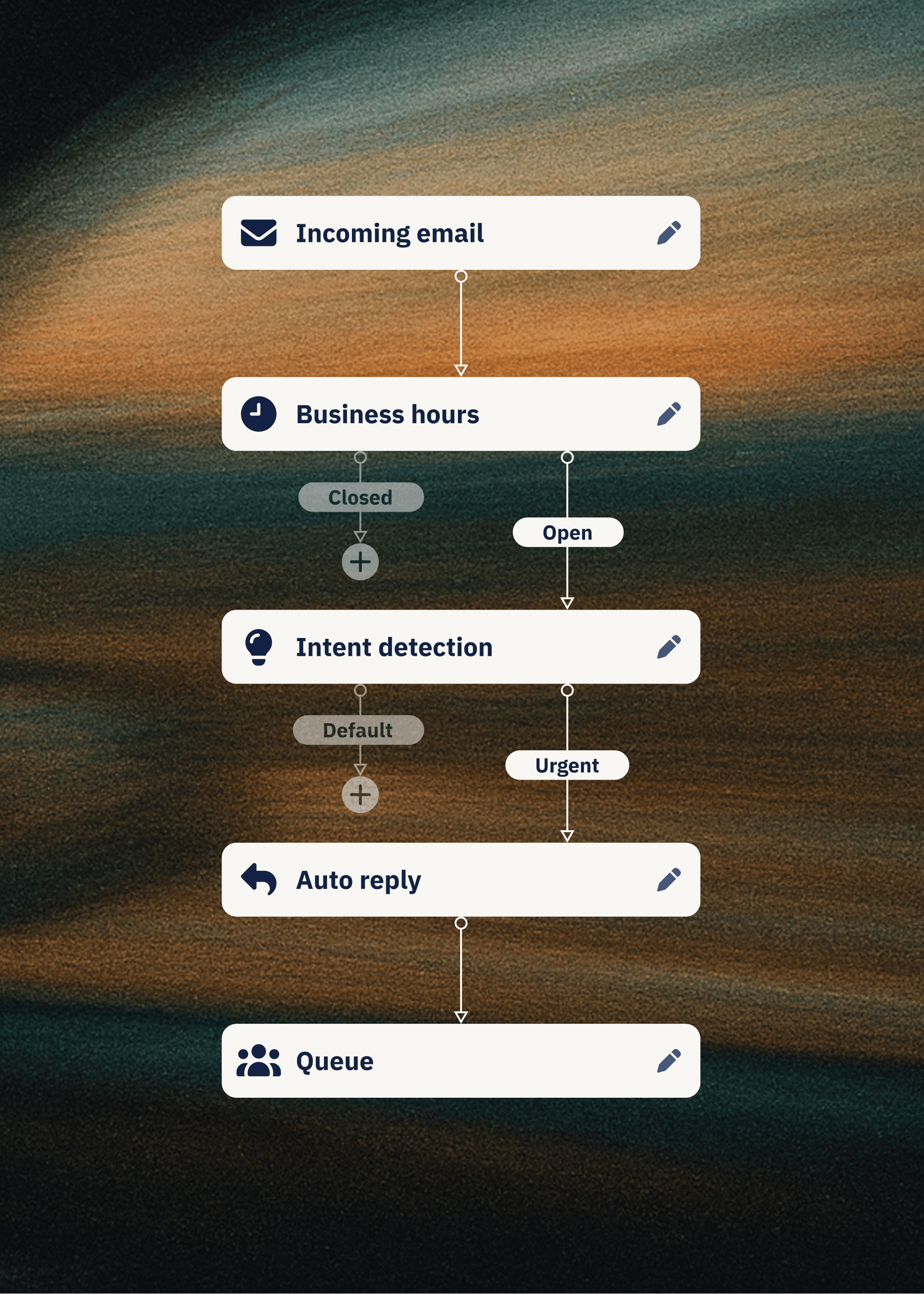
AI Intent Detection reads what the customer wrote and picks up on intent a menu never offered. Dixa's AI Intent Detection identifies what customers need before an agent sees the conversation and routes, triggers an automation, or filters spam before a human gets involved.
Matching conversations to the right agents
Skills-based routing matches conversations to agents by expertise, language, customer value, issue type, or any combination you define. A VIP customer writing in German about a damaged order goes to a German-speaking senior agent instead of the general queue.
Dixa routes by skill, language, priority, workload, and VIP status. Higher tiers add AI Intent Detection and routing with live external data such as order value or loyalty tier. The CS team builds and changes these rules in Dixa's Flow Builder, without filing an IT ticket.
The customer states their problem once, the system routes correctly, and the agent opens it with full context.
Dixa’s unified interface makes it easy to manage phone, email, and chat from a single window, reducing the need to switch between tools. The skill‑based routing and queue management help ensure customers are connected to the right agent quickly. Its clean, intuitive design shortens onboarding time for new team members, and the customer support team is generally responsive and helpful. - Rodrigo M. on G2
Agent assist inside the workspace
A copilot in a separate window is another tab to switch to. The agent copies context from one screen, pastes it into another, waits for a suggestion, then copies the suggestion back. The time saved on drafting is lost on switching.
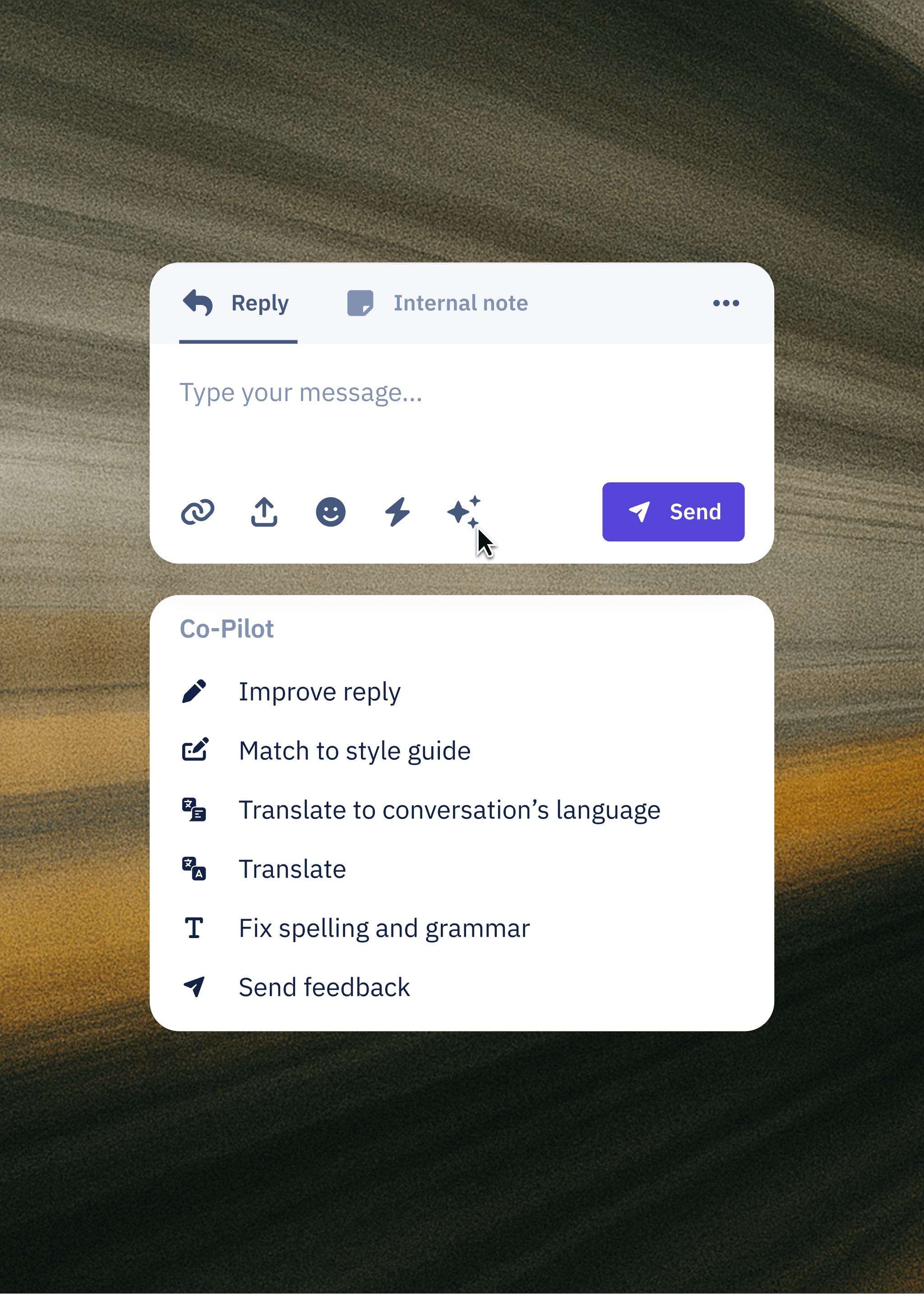
Native agent assist lives in the workspace the agent already uses. Suggested responses, order context, and conversation history sit on the same screen as the conversation itself.
The cost of switching tabs
Charles Tyrwhitt ran separate systems for phone, email, and chat, plus an ERP and a survey tool, and agents switched between them for every conversation. New-agent induction took three months. Dixa's unified agent workspace puts order history, conversation history, and live channel access on one screen so agents stop switching tabs. After the switch, induction fell to one month.
One screen when the customer calls back
A customer emails on Monday about a delayed order and calls on Wednesday because the tracking has not updated. The agent answering the call sees the full email thread, order status, tracking data, and an AI-suggested response in one screen. The customer does not hear "can you remind me what this is about?"
Where Co-Pilot fits in
Co-Pilot, an add-on, provides in-conversation AI assistance at €39 per agent per month. It suggests responses, surfaces relevant knowledge base articles, and drafts replies that match your brand voice.
Why handle time drops
Less context-gathering, fewer tab switches, and suggested responses that match brand voice. Rapha reduced average handle time to 4 minutes against a 6-minute industry benchmark. The saving comes from removing the dead time before the agent can start helping.
Knowing when to hand a conversation to a human
Escalation is a designed workflow with thresholds, context, and ownership. The brands that get AI customer support right treat it as strategic automation: the AI handles what it can resolve, and hands the rest to a human with everything the human needs.
Complex complaints and sensitive issues need human empathy, so the architecture should define that line clearly and make the handoff invisible to the customer.
What Mim resolves on its own
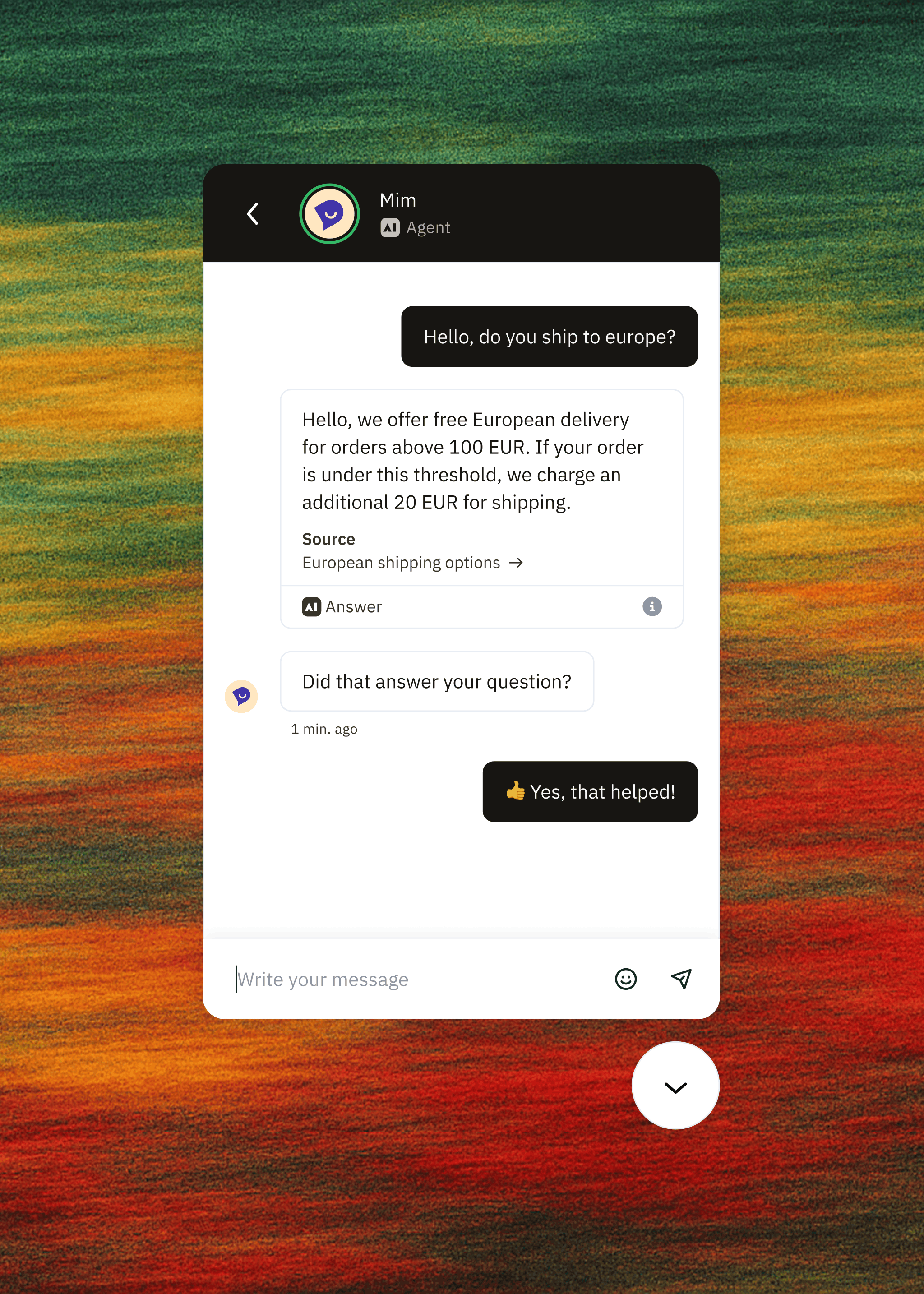
Mim resolves refunds, order updates, pre-purchase questions, and WISMO queries from first message to confirmation. It connects to Shopify, Magento, and custom integrations and finishes the job: the refund processed, the order updated, the confirmation sent.
Complex complaints, sensitive issues, and high-emotion conversations stay with your team. Your CS team sets the guardrails and adjusts them as Mim learns.
Setting the escalation thresholds
Escalation thresholds include complex complaints that need discretion, customers who are visibly upset and need to feel heard, policy exceptions that need authorisation, and anything ambiguous enough that a wrong answer would cause real damage. A customer who writes "this is the third time I am contacting you" triggers a different path than a first-time order-status query.
When you spot a pattern on a Tuesday morning, you change the threshold that afternoon in the Flow Builder, with no IT ticket and no consultant day rate.
What the agent sees at handoff
When Mim escalates, the human agent picks up with the full conversation context: what the customer said, what Mim already did, what remains unresolved. The agent continues where Mim left off, so the customer does not repeat themselves and the agent does not start from zero.
The problem with containment metrics
Containment rate measures how many conversations the AI kept away from humans, whether or not the customer's problem got solved. A deflected conversation that comes back as a phone call still has an open problem. Resolution rate counts only the conversations that ended with the problem solved.
Peak season without the burnout
Peak season exposes weaknesses a CS operation already carries. If your team handles routine volume manually, an 8x Black Friday spike breaks the queue in November. Hiring more people is the usual answer, and changing how conversations are handled is the structural one.
When Black Friday volume hits
tink cut Black Friday seasonal hires from 80–90 to 10 after rolling out Mim. Mim absorbed the routine volume, and the team handled the complexity that needed a human.
Charles Tyrwhitt, running a 130-agent team, cut email first response time from 3 hours 45 minutes to roughly 50 minutes. That is a headcount argument the CFO can read at a glance.
AI resolving routine queries without an agent is what absorbs the spike. Seasonal headcount papers over one season, while AI built into the queue changes capacity for good.
The queries that follow scripts
WISMO, refund status, order updates, and pre-purchase questions follow scripts. The answers live in your OMS, your knowledge base, and your shipping data. An AI agent connected to those systems resolves them without human involvement.
Some conversations never suit automation. Complex complaints, sensitive situations, and high-value customer relationships need judgment and empathy, and those are where your best agents spend their shifts instead of copying tracking numbers into reply templates.
Keeping CSAT steady through peak
CSAT holds through peak when routine volume resolves before it hits the queue and agents have capacity for complex conversations. Charles Tyrwhitt's CSAT moved from 91% to 92.4% and NPS from 60 to 67 after switching to Dixa. Those numbers held because the team was not drowning in order-status queries during the period leadership watches most closely.
AI responses must sound like your brand, and your CS team controls the knowledge base. If the AI sounds like a different company, CSAT drops regardless of resolution speed.
How to evaluate an AI help desk
Here are five criteria to take into a vendor demo.
- Resolution rate over containment rate. Ask how the vendor defines resolution. If the answer involves the customer not coming back within a time window, that is containment with extra steps.
- Cost per resolution. Ask for the per-conversation price, whether it rises as volume grows, and whether it changes as the AI gets better. Ask how the vendor defines a billed outcome, and whether a customer giving up can count as one. Dixa's flat rate does not rise as the AI improves, and a customer giving up never counts as a billed outcome.
- FRT and AHT during peak. Ask for Black Friday data from a named brand in your vertical.
- Escalation rate with context pass-through. Ask the vendor to demonstrate what the agent sees when the AI hands off. If the demo shows a blank ticket with a transcript attached, the context is not passing through.
- Time to change a routing rule. Ask the vendor to change a routing rule in the demo. If the answer involves professional services, you have your answer.
The three questions that cut through
Three questions cut through the pitch. What is the contracted AI volume and what happens when you exceed it? What is the cost per conversation, and does it change if the AI escalates? What channels does the AI cover, phone included?
Dixa's answer: Mim costs a flat €0.40 per conversation, with no allowance cap, whether it resolves or escalates. The rate never rises with volume. It works on every channel, phone included, with voice calls in beta. The rate does not change as resolution rate improves, so the value of better AI stays with you.
Running the architecture test
The test is architectural. Does the AI run in the same queue as human agents? Does agent assist live in the workspace or a separate window? Can the CS team change routing rules without an IT ticket? Does escalation pass full conversation context?
Zendesk's marketplace of 1,000+ integrations serves enterprise teams with complex stack requirements. Dixa covers the same operational need with native omnichannel and no-code routing, without the per-resolution AI bill that scales against you as performance improves.
Gorgias's deep Shopify integration serves smaller Shopify-native brands at low volumes. Dixa supports Shopify order management alongside Magento, WooCommerce, and custom builds, with native voice on every plan, for brands that need more than one storefront platform.
Competitor prices change over time. The figures in this table are as of November 2026, so check each vendor's current pricing page to work with the latest figures before you budget.
Imagine every pain point you've experienced with Intercom, Zendesk, or similar platforms—now remove them. That’s Dixa. It’s agent-friendly, management-friendly, and provides easily digestible data, perfect for those with little time to spend formatting. Their support team is outstanding; they don’t just offer assistance but genuinely care about the success of your team. - Bailey A. on G2
Timing the rollout around peak
Go live at least six weeks before peak starts (early October for a mid-November peak). If that date has passed, go live in January and do not launch during peak.
Most rollouts go live in two to four weeks with guided onboarding. The cautious option adds two weeks of parallel testing for a four-to-six-week total, which gives you a buffer to validate routing, escalation, and brand voice before customers interact with the AI.
The migration fear is rational: a botched switch costs CSAT points at the worst possible time. A named timeline, a named onboarding owner, and a go-live date tied to your peak calendar answer that fear better than any promise that implementation is easy.
See how brands in your vertical are handling peak season volume. Book a 30-minute demo.
FAQs
What is the difference between AI customer service and a chatbot?
A chatbot answers FAQs from a script and deflects conversations it cannot handle. AI customer service resolves conversations by connecting to your systems, completing transactions like refunds and order updates, and escalating to a human with full context when judgment is needed.
How does AI help desk software handle escalations?
AI built into the help desk escalates when a conversation needs discretion: complex complaints, customers who are visibly upset, policy exceptions needing authorisation, or anything ambiguous enough that a wrong answer would cause real damage. The human agent receives the full conversation history, what the AI already attempted, and what remains unresolved, so the customer never repeats themselves.
Can AI customer support maintain CSAT during peak season?
Yes, when routine volume resolves before it reaches the queue and agents retain capacity for complex conversations. Charles Tyrwhitt's CSAT moved from 91% to 92.4% and NPS from 60 to 67 after switching to Dixa, with email first response down to roughly 50 minutes on the 130-agent team.
What should I ask vendors when evaluating AI help desk software?
Ask for the per-conversation cost and whether it changes on escalation, the contracted AI volume and overage rate, which channels the AI covers (phone included), and whether your CS team can change routing and escalation rules without an IT ticket. Request Black Friday performance data from a named brand in your vertical.
Key terms glossary
Agentic AI: AI that executes multi-step tasks such as processing refunds, updating orders, and answering pre-purchase questions by connecting to your systems. It resolves conversations instead of deflecting them.
Resolution rate: The percentage of conversations the AI resolves without human involvement. This measures whether the customer's problem got solved.
Containment rate: The percentage of conversations the AI keeps away from human agents, whether or not the customer's problem was solved. A contained conversation can return as a phone call the next day.
Intelligent routing: Rule-based distribution of conversations to the best-matched agent using criteria such as skill, language, priority, workload, and VIP status.
AI Intent Detection: AI that reads the content of a customer conversation to identify what the customer needs, then routes, triggers an automation, or filters spam before a human gets involved.
Escalation threshold: A condition the AI recognises as needing human judgment, such as complex complaints, visibly upset customers, policy exceptions needing authorisation, or anything ambiguous enough that a wrong answer would cause real damage, that triggers a handoff to a human agent with full context.
Team Hub: Dixa's one-screen agent workspace showing live order data, conversation history, and customer context side by side, so agents stop switching tabs.
Mim: Dixa's AI agent. It resolves conversations on every channel, phone included (voice calls are in beta), at €0.40 per conversation whether it resolves or escalates, and hands off to human agents with full conversation context when it cannot resolve.
Author

Stay in the know
Get CX insights, proven strategies, & the latest news in your inbox every month!